
Imagine you’re showing how to thread a sewing machine. A viewer on Twitch asks, “Which needle are you using?” A moment later, someone on YouTube asks to see the last step again. With text-to-speech (TTS) on, you can keep your hands on the thread and answer both questions. TikChat gives you one speaker control for the whole conversation.
Do you need to turn on TTS for each platform?
No. Switch on Chat Reader once in the TikChat session. It reads new text comments from whichever supported channels are connected, whether you’re streaming on one platform or several. If messages from one channel are missing while you can hear the others, check that channel’s connection in MultiChat.
How do you turn on Chat Reader during a LIVE?
Click the speaker icon beside the settings gear once your LIVE chat has loaded.
- Open your LIVE session in TikChat and find the Live chat toolbar. Hover over the speaker button to see its name, Chat Reader.
- Click it once. If several messages are already on screen, leave them there. The reader starts with comments that arrive after you switch it on.
- Listen for the next fresh comment. To stop playback, click the same speaker again. You can keep following the conversation on screen.
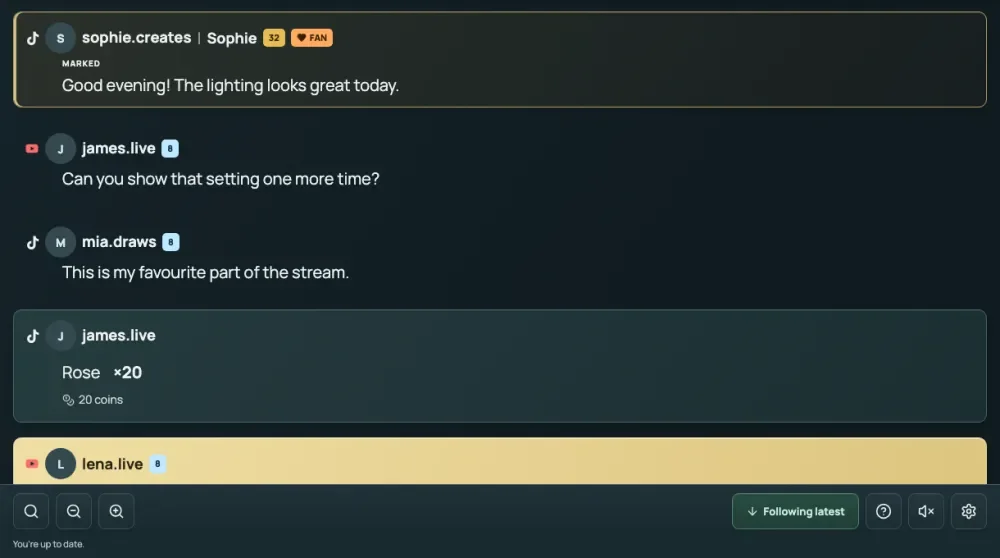
In the interactive demo, look for the speaker at the right of the Live chat toolbar. The conversation uses sample data.
Will viewers hear the comments too?
Viewers can hear the voice if your streaming setup captures its audio. For private listening, use headphones and check which audio sources your broadcast includes. Headphones keep the voice away from an open microphone, but a desktop-audio source can still pick up browser playback. A short test recording lets you hear what your audience would hear.
Which voice will read my chat?
TikChat automatically chooses a local voice from the ones your browser makes available. It looks first for an exact match to your browser language, then for the same language in another region. For example, a browser set to British English can use a US English voice if that’s the available English match.
If neither match exists, TikChat tries the default local voice, then the first local voice on the list. It uses that voice for the session’s comments, even when a viewer types in another language. Changing the language of TikChat’s menus leaves the browser’s voice preference in place.
Why is Chat Reader silent?
Check the speaker control, then look for a new text comment and any message under the toolbar.
What you seeWhat to try| The speaker is disabled | Let chat history finish loading. If the button still says “Chat Reader unavailable”, try a browser that supports speech playback on your device. |
| Chat Reader is on, but the last comment is silent | Wait for someone to send a new text comment. A gift, like or viewer arrival won’t trigger speech. If fresh comments are silent too, check your output device and tab volume. |
| TikChat says it can’t find a local voice | Follow the voice-installation link under the toolbar. Add a voice for your preferred language in your device settings, then return to TikChat and try again. |
| A message asks you to allow playback or mentions another tab | For playback permission, click Chat Reader again. For a tab conflict, turn the reader off in the other TikChat tab, then enable it in the one you’re using. |

The demo checks for a local English voice. In your LIVE session, Chat Reader checks the local voices available for your browser language, then tries the other local voices.
What happens when comments arrive faster than the voice can speak?
Chat Reader keeps up to 12 comments waiting and drops the oldest waiting one when a newer comment needs the space. It speaks one comment at a time, using up to 500 characters from each. During a rush of short replies, a question can scroll past without being spoken.
If you catch “What needle size?” just as you finish threading the machine, answer it while the setup is still in view. If you only catch “needle”, open Search chat and type that word to find the question in the conversation captured during the current LIVE. For a closer look at how comments from four platforms appear together, see TikChat’s four-platform MultiChat pilot.